


How it Works
Three roles.
One reconciled system
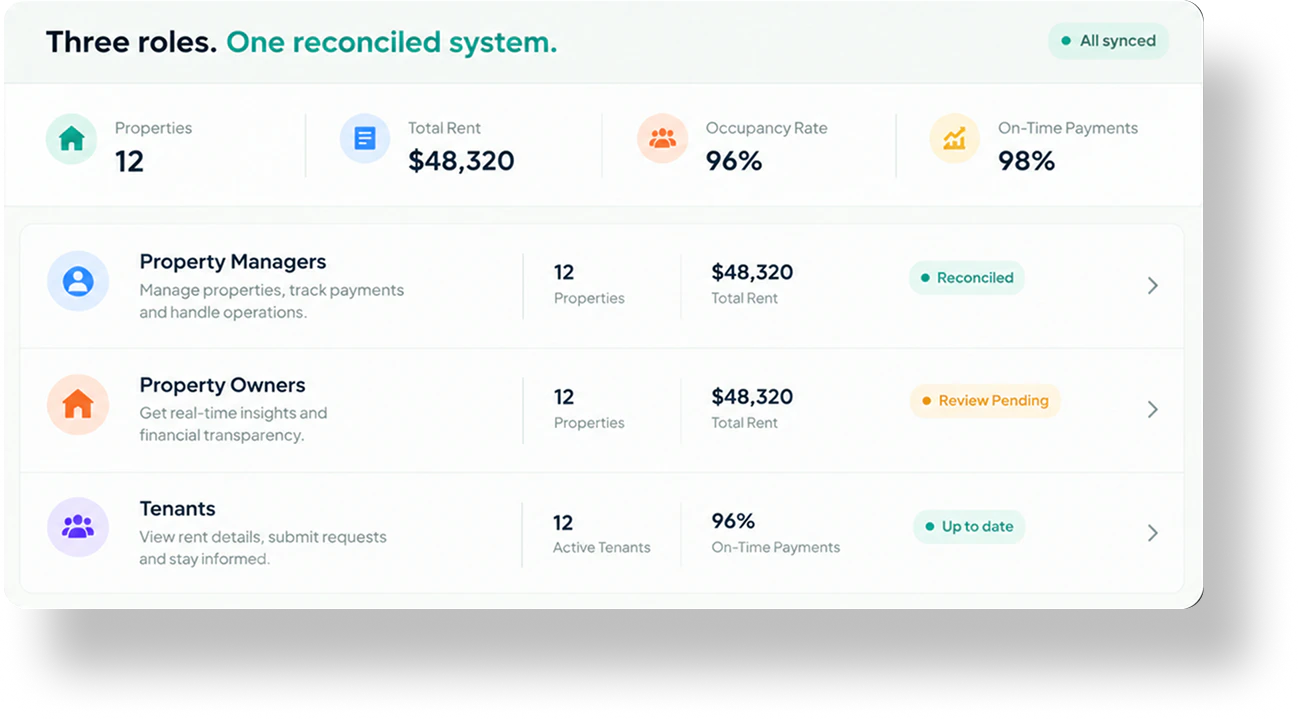
A tenant pays rent. A manager handles an invoice. An owner checks performance. Each is a different moment — but every one of them writes to, and reads from, the same ledger.
- CapturePayments, invoices and leases come in.
- MatchAI ties each item to a lease, unit or vendor.
- CodePosted to the right property and GL account.
- ReconcileChecked against every bank transaction.
- ReportStatements and portfolio views stay current.
For Tenants
Pay rent once. PropLedger matches and posts it the moment it clears.
A tenant sees a simple payment status. Behind it, PropLedger matches the payment to the lease, posts it and reminds them before anything turns overdue.
- Rent payment arrivesPicked up straight from the bank feed.
- Matched to the leaseTenant and unit confirmed automatically.
- Posted the moment it clearsBalance updates instantly.
- Reminders before it is overdueNotices go out before the due date.
- Lease and balance in one placeLease, balance and history at a glance.

Result: the tenant pays once. The payment becomes part of the property's traceable financial record.
For Property Manager
Invoices coded, banks reconciled, collections handled.
Managers stop re-keying and start reviewing. PropLedger extracts, codes and routes the work, then reconciles it, and your team confirms what looks right.
- Invoices coded and routedRead, coded and sent for approval.
- A/P created and codedPosted to the right GL account.
- Every bank transaction reconciledOnly real exceptions reach you.
- Collection notices on past-duesFlagged by days late, sent in one click.
- Lease terms extractedKey terms pulled from the lease document.

Result: an invoice becomes a booked, reconciled transaction without re-entry between tools.
For Property Owner
Statements that come from the books, not around them.
In most setups, a rent payment lands in a bank account and someone has to notice it, identify it, and enter it against the right lease. PropLedger does that matching the moment the payment arrives.
- Statements from the ledgerBuilt directly from posted entries.
- Always-current portfolio viewEvery property in one live view.
- Sign-off flags only when neededOwners approve only what matters.
- Every figure is traceableTrace any number to its source.
- One version of the truthEveryone reads the same ledger.

Result: owners trust the numbers because they trace to the same system as the bank.
The difference
The same work, without the re-keying
Where separate tools and spreadsheets slow the month down, one connected ledger removes the handoffs.
| Task | Typical setup | With PropLedger |
|---|---|---|
| Rent posting | Spot the deposit, identify the tenant, enter it by hand | Matched to the lease and posted when it clears |
| Vendor invoices | Open the PDF, retype, choose a GL code | Details extracted and coding proposed for approval |
| Bank reconciliation | Tick off lines against a statement at month end | Every transaction reconciled automatically |
| Collections | Chase overdue tenants from a spreadsheet | Aging view with reminders and notices in one click |
| Owner statements | Assembled separately from the books | Generated from the reconciled ledger |
Where Ai helps
AI does the matching. People make the decisions.
Match
Payments and bank lines are matched to leases, invoices and ledger entries.
Bank lineLeaseCode
Vendor invoices get a suggested property and GL account for review.
InvoiceGL codeExtract
Lease terms are read from documents so nobody retypes them.
Lease PDFTenant record
FAQs
Questions we hear most
Can't find your answer? Talk to us and we will walk you through it.
What is PropLedger?
PropLedger connects property managers, owners and tenants through one reconciled system — so rent, invoices and statements stay accurate, visible and traceable.
How does bank reconciliation work?
Every bank transaction is checked against the ledger automatically. Matches are reconciled for you, and only real exceptions are raised for your team to review.
Does the AI post entries without approval?
No. AI handles matching, coding and extraction, but approvals and exceptions still go through a person — nothing is booked blindly.
How are rent payments handled?
Rent is picked up straight from the bank feed, matched to the right lease and posted the moment it clears. Tenants get reminders before anything turns overdue.
How are owner statements generated?
Statements are built directly from posted, reconciled entries, so owners see the same numbers as the bank and every figure traces back to its source.
What happens with late-paying tenants?
Past-dues are flagged by days late in an aging view, with reminders and collection notices sent in one click.
Can I manage multiple properties and owners?
Yes. PropLedger is multi-property and multi-owner ready — financials roll up by property and every entity stays separate.
How do I get started?
Request a demo and we'll walk through rent processing, invoice approval and owner reporting on your own properties.
See all three workflows on your own properties.
We'll walk through rent processing, invoice approval and owner reporting in a live demo.
Request a Demo
'%3e%3cpath%20id='Vector'%20fill-rule='evenodd'%20clip-rule='evenodd'%20d='M34.4047%202.1654C31.587%200.538562%2027.804%200.538563%2020.238%200.538563C12.6721%200.538563%208.88914%200.538562%206.07137%202.1654C4.22541%203.23115%202.69254%204.76405%201.62678%206.60998C-5.81287e-05%209.42775%20-5.81287e-05%2013.2107%20-5.81287e-05%2020.7766C-5.81287e-05%2028.3426%20-5.81287e-05%2032.1255%201.62678%2034.9433C2.69254%2036.7892%204.22541%2038.3222%206.07137%2039.388C8.88914%2041.0147%2012.6721%2041.0147%2020.238%2041.0147C27.804%2041.0147%2031.587%2041.0147%2034.4047%2039.388C36.2506%2038.3222%2037.7835%2036.7892%2038.8494%2034.9433C40.4761%2032.1255%2040.4761%2028.3426%2040.4761%2020.7766C40.4761%2013.2107%2040.4761%209.42775%2038.8494%206.60998C37.7835%204.76405%2036.2506%203.23115%2034.4047%202.1654ZM13.2161%2025.8975C12.6233%2026.4902%2011.6623%2026.4902%2011.0695%2025.8975C10.4768%2025.3049%2010.4768%2024.3438%2011.0695%2023.751L19.1647%2015.6557C19.7575%2015.063%2020.7185%2015.063%2021.3113%2015.6557L29.4065%2023.751C29.9993%2024.3438%2029.9993%2025.3049%2029.4065%2025.8975C28.8137%2026.4902%2027.8528%2026.4902%2027.26%2025.8975L20.238%2018.8756L13.2161%2025.8975Z'%20fill='%23164E3F'/%3e%3c/g%3e%3cdefs%3e%3cclipPath%20id='clip0_0_250'%3e%3crect%20width='40.4762'%20height='42.5'%20fill='white'/%3e%3c/clipPath%3e%3c/defs%3e%3c/svg%3e)